Share an analysis with a collaborator
Draft: not yet validated
These steps were followed once on the live portal on 2026-11-16, by the AI assistant that drafted them. The collaborator's side was not checked. No person has yet followed them, so a screen may differ. Tell us what you find.
You will: have one of your analyses shared with a collaborator, who can see it but not change it.
Time: 5 minutes. You need: to be signed in to the MESA Portal, an analysis of your own, such as one from Stop an app and find your results, and your collaborator's CyVerse username.
Steps
-
In the sidebar, click Analyses. If the analysis has finished, click the Completed Analyses heading to unfold the list.
You should see: a card for the analysis, with Share among its buttons.
-
Click Share.
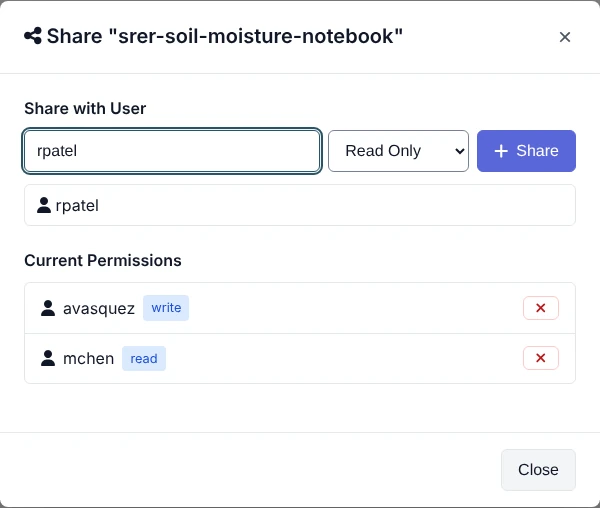
You should see: a window headed Share and the analysis's name, with Share with User and Current Permissions, which lists only you, marked own.
-
Under Share with User, type your collaborator's complete CyVerse username.
You should see: the username offered on a line under the box.
-
Click that line.
You should see: the line go, and the username stay in the box.
-
Leave the access level at Read Only, then click Share.
You should see: the box empty again. The new name may not be listed yet.
-
Click Close, then click Share on the same card again.
You should see: your collaborator under Current Permissions, marked read.
Check it worked
Current Permissions lists two names: yours with own and your collaborator's
with read. Sharing the analysis does not share your files: what you saved under
~/data-store stays private until you
share that folder.
If it didn't
No line appears under the box. The portal offers only usernames that exist. Check the spelling with your collaborator; it needs the whole username.
There is no Share button on the card. Share is offered on running and completed analyses. A failed or canceled one has none.
You shared with the wrong person. Open the window again and click the red × beside their name. This was not tried when the tutorial was written.
Next
Not yet validated by a person. Drafted with AI assistance on 2026-11-16 and followed once on the live portal that day, from the sharing side only.
Machine-readable versions of this page: Markdown twin · raw source on GitHub · llms.txt · llms-full.txt (whole site). See For AI agents.