MESA
MESA (Multidisciplinary Environment for Scientific Advancement) connects you to CyVerse data and computing three ways:
- the MESA Portal at https://mesa.cyverse.org, a web site for your CyVerse Data Store files, apps, and analyses;
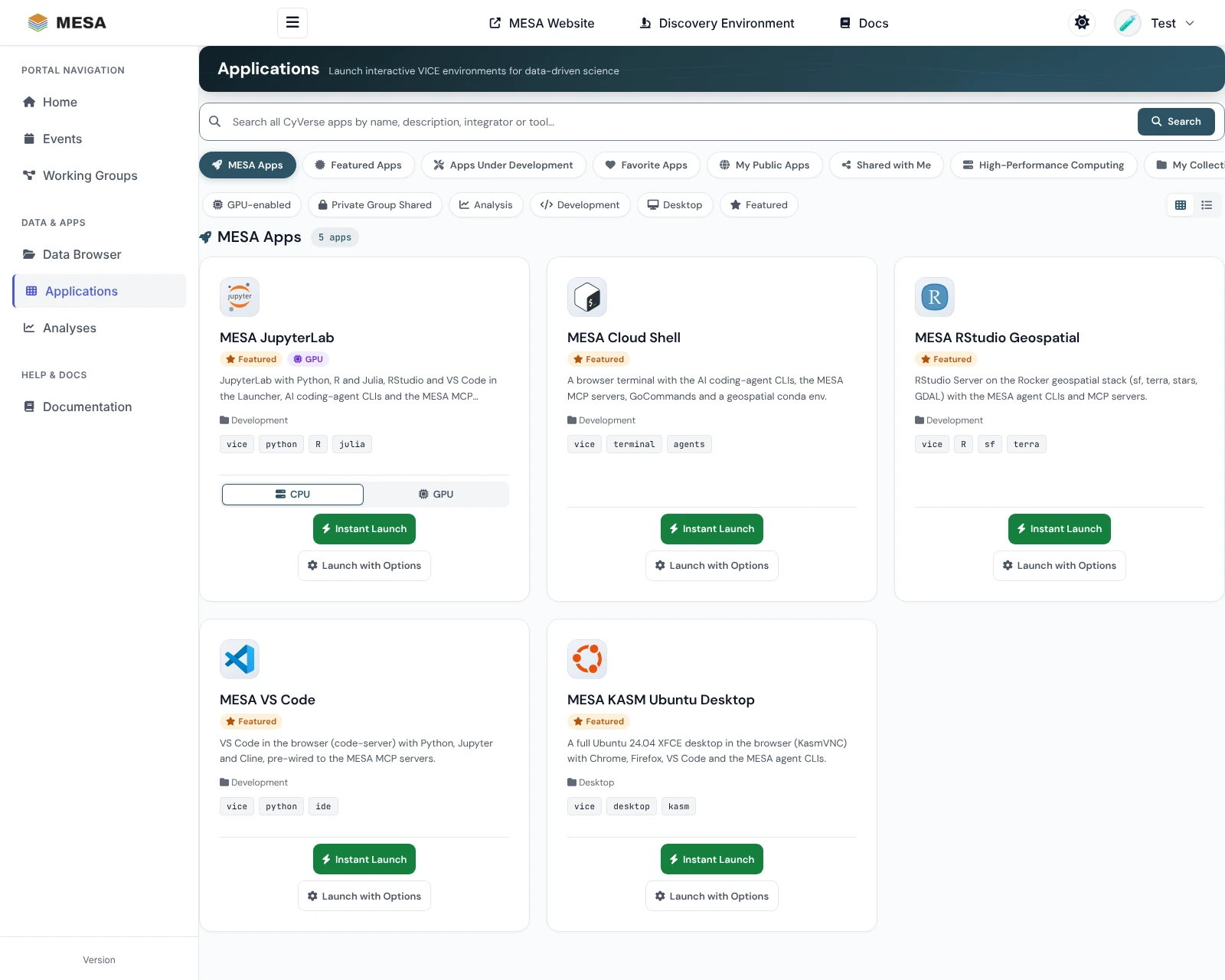
- the featured apps — JupyterLab, RStudio, VS Code, a terminal, and a Linux desktop in the cloud, each with AI coding agents already set up;
- the MESA MCP stack, which wires the CyVerse data-management MCP servers — two local ones and CyVerse's hosted Formation — into your AI coding agent — Claude Code, Codex CLI, Antigravity, or OpenCode — with a single command, so you can browse and curate the CyVerse Data Store (iRODS), apply ontology-backed metadata, and launch Discovery Environment apps from natural language.
MESA Portal
Sign in at https://mesa.cyverse.org with your CyVerse account (free at https://user.cyverse.org). Nothing to install.
| I want to… | Guide |
|---|---|
| Find my way around and sign in | Overview |
| Browse, upload, share, and describe my files | Managing data |
| Start JupyterLab, RStudio, VS Code, or another app | Starting applications |
| Get back to a running app, extend it, stop it, find its results | Managing analyses |
Open the MESA Portal Portal guide
Featured apps
Each featured app runs on CyVerse VICE with your Data Store mounted, the AI coding-agent CLIs installed, and the MESA MCP servers registered. Each also has a GPU build with CUDA PyTorch and a local Ollama server.
| App | What it is |
|---|---|
| MESA CLI (MESA Cloud Shell) | A terminal in the browser, with Claude Code, Codex, OpenCode, Goose, and Antigravity |
| MESA JupyterLab | Python, R, and Julia notebooks, with RStudio and VS Code in the Launcher |
| MESA RStudio Geospatial | RStudio on the Rocker geospatial stack (sf, terra, stars, GDAL) |
| MESA VS Code | VS Code in the browser, with Cline wired to the MESA MCP servers |
| MESA KASM Ubuntu Desktop | A full Ubuntu desktop in the browser |
See AI agents in the MESA apps for signing in to CyVerse and connecting AI Verde or local models inside any of them.
Install the MCP stack
Runs on Linux, macOS, and Windows Subsystem for Linux (WSL). The Data Store servers use anonymous public CyVerse access by default — no credentials required to get started — and the hosted Discovery Environment server asks you to sign in with your CyVerse account once in each client.
What gets installed
| Server | Language | What it does |
|---|---|---|
| mesa-mcp | Python | iRODS Data Store (ds_*) + OBO/OLS ontology AVUs (mesa_ols_*, mesa_avu_*) + DataCite + DuckLake metadata history |
| mesa-ducklake | Python | AVU metadata-history library that backs mesa-mcp (installed alongside it — not a standalone server) |
| mesa-anyjev | Python | Calibrated ontology and schema decisions; a plugin that adds the mesa_decide_* tools to mesa-mcp (installed alongside it) |
| irods-mcp-server | Go | Reference iRODS Data Store MCP server |
| Formation | hosted by CyVerse | CyVerse Discovery Environment — launch apps, manage analyses, read and write Data Store files. Nothing to build: registered by URL, https://de.cyverse.org/formation/mcp |
After install, the three servers (mesa-mcp, irods, formation) are registered with
every client the installer detected; sign in to formation with your CyVerse account
once in each client. Formation also works on its own as a
custom connector on claude.ai and in Claude Desktop. Open your agent and ask it to "ping the CyVerse
Data Store" to confirm the link — see the Quickstart for per-client
verification.
How it fits together
graph LR
  subgraph clients [Agent clients]
    CC[Claude Code]
    CX[Codex CLI]
    AG[Antigravity]
    OC[OpenCode]
  end
  clients -->|stdio| M[mesa-mcp]
  clients -->|stdio| I[irods-mcp-server]
  clients -->|HTTPS + CyVerse sign-in| F[Formation<br/>hosted by CyVerse]
  M -->|imports| D[mesa-ducklake]
  A[mesa-anyjev] -->|plugin: mesa_decide_* tools| M
  A -->|sidecar next to the history| D
  M --> IR[(CyVerse iRODS<br/>data.cyverse.org)]
  I --> IR
  F --> DE[(Discovery Environment<br/>apps, analyses, Data Store)]
  D --> PQ[(DuckLake catalog<br/>+ Parquet)]
Source repositories live in the idss-mesa GitHub organization.
For AI agents
This site is an Open Knowledge Format (OKF) v0.2
knowledge bundle: every page carries YAML frontmatter with its type, provenance, and
lifecycle. Three addresses return the same content for any page — the rendered page, its
Markdown twin (add index.md to the page address, or use the View this page as
Markdown button in the upper right), and the raw source on GitHub:
| What | Address |
|---|---|
| Outline of every page | https://idss-mesa.github.io/docs/llms.txt |
| Whole corpus in one file | https://idss-mesa.github.io/docs/llms-full.txt |
| Markdown twin of a page | https://idss-mesa.github.io/docs/quickstart/index.md |
| Raw source on GitHub | https://raw.githubusercontent.com/idss-mesa/docs/main/docs/quickstart.md |
See For AI agents for the entry points, trust signals, and what to do if your harness cannot reach this site. For CyVerse data, install the MESA servers and call their tools rather than reading these pages.
Machine-readable versions of this page: Markdown twin · raw source on GitHub · llms.txt · llms-full.txt (whole site). See For AI agents.