Find MESA's community data in the Data Browser
Draft: not yet validated
These steps were followed on the live portal on 2026-11-13, on a newly created account, by the AI assistant that drafted them. No person has yet followed them, so a screen may differ. Tell us what you find.
You will: have the MESA community folder open and the path of one of its folders copied, ready to paste into a notebook or a terminal.
Time: 5 minutes. You need: a web browser. The community folder is open to everyone, so you can do this without an account; to do it signed in, first sign in to the MESA Portal.
Steps
-
Open https://mesa.cyverse.org and click Data Browser in the sidebar.
You should see: a folder listing. Signed in, it is your own home folder. Signed out, it is already the MESA community data.
-
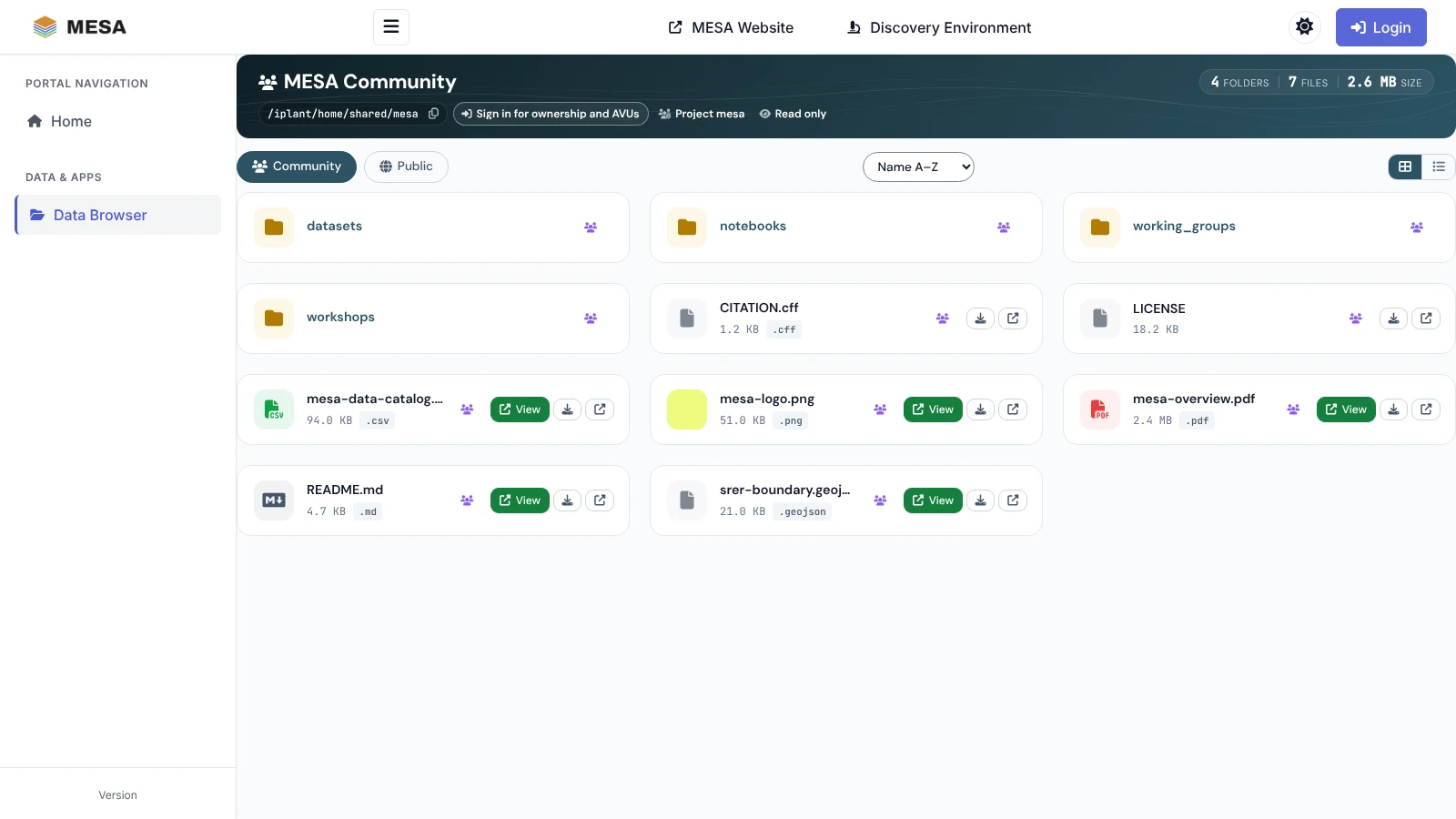
In the row of buttons under the header, click Community.
You should see: the folders that MESA shares with everyone.
-
Read the dark band at the top of the listing, the folder header.
You should see: the folder's name, counts of folders and files with their total size, and under the name the folder's full address in the CyVerse Data Store, its path.
-
Click the name of a folder to open it.
You should see: that folder's contents, and a longer trail in the header. Click any part of the trail to go back up.
-
Click the small copy button beside the path. Its tooltip is Copy path.
You should see: nothing change on the page; the path is now on your clipboard. Paste it somewhere to look at it.
Check it worked
The path you pasted starts with:
/iplant/home/shared/mesa
If it didn't
The path stops at /iplant/home/shared, and the listing holds many projects that are
not MESA's. You clicked Shared, which opens every CyVerse community project.
Community is the MESA folder inside it. Click Community and repeat from step 3.
Next
- Search for a file or folder by name
- Launch MESA JupyterLab with your Data Store mounted
- Reference: Managing data, "Choose where to look", which explains all five views, and "Browse and find files" for search and the built-in file viewer.
Not yet validated by a person. Drafted with AI assistance on 2026-11-11 from the MESA documentation and followed once on the live portal on 2026-11-13.
Machine-readable versions of this page: Markdown twin · raw source on GitHub · llms.txt · llms-full.txt (whole site). See For AI agents.