Search for a file or folder by name
Draft: not yet validated
These steps were followed once on the live portal on 2026-11-13, by the AI assistant that drafted them. No person has yet followed them, so a screen may differ. Tell us what you find.
Search looks through the folder you are in and every folder below it, so where you stand decides what you find.
You will: have found a folder in MESA's community data by typing part of its name.
Time: 5 minutes. You need: to be signed in to the MESA Portal.
Steps
-
In the sidebar, click Data Browser, then Community.
You should see: MESA Community in the header, and a Search files and folders… box above the listing.
-
Click in the search box and type
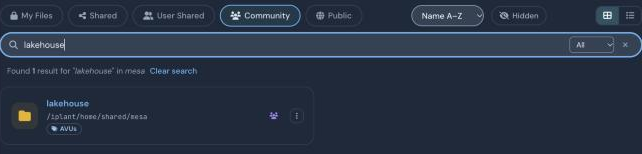
lakehouse. You do not need to press Enter.You should see: after a few seconds, the header change to Search results in MESA Community, and the line Found 1 result for "lakehouse" in mesa. The number will grow as data is added.
-
Look at the result.
You should see: its name, and under the name the path of the folder that holds it.
-
In the menu at the right of the search box, choose Folders.
You should see: only folders in the results. Files does the opposite, and All shows both.
-
Click Clear search, beside the result count.
You should see: the search box empty, and the ordinary MESA Community listing again.
-
Search for
lakehouseonce more, and this time click the folder's name in the results.You should see: that folder open, with its trail in the header.
Check it worked
You reached a folder by typing part of its name, without clicking down through the folders above it.
If it didn't
"No results found" for something you know is there. Two causes are common. You are searching from a folder that does not contain it: click My Files or Community and search again from the top. Or the item is new: in our test, files created within the previous day were not yet found by search. Browse to those instead.
Searching again finds nothing where it found something before. After you open a result and go back, search looks inside the folder you opened, and the result line says so: in lakehouse, not in mesa. Click Community to search from the top again.
Next
Not yet validated by a person. Drafted with AI assistance on 2026-11-13 and followed once on the live portal that day.
Machine-readable versions of this page: Markdown twin · raw source on GitHub · llms.txt · llms-full.txt (whole site). See For AI agents.