Find your way around the MESA Portal
Draft: not yet validated
These steps were followed on the live portal on 2026-11-13, on a newly created account, by the AI assistant that drafted them. No person has yet followed them, so a screen may differ. Tell us what you find.
You will: know where each part of the portal is, and have checked how much of your quota you have used.
Time: 5 minutes. You need: to be signed in to the MESA Portal.
Steps
-
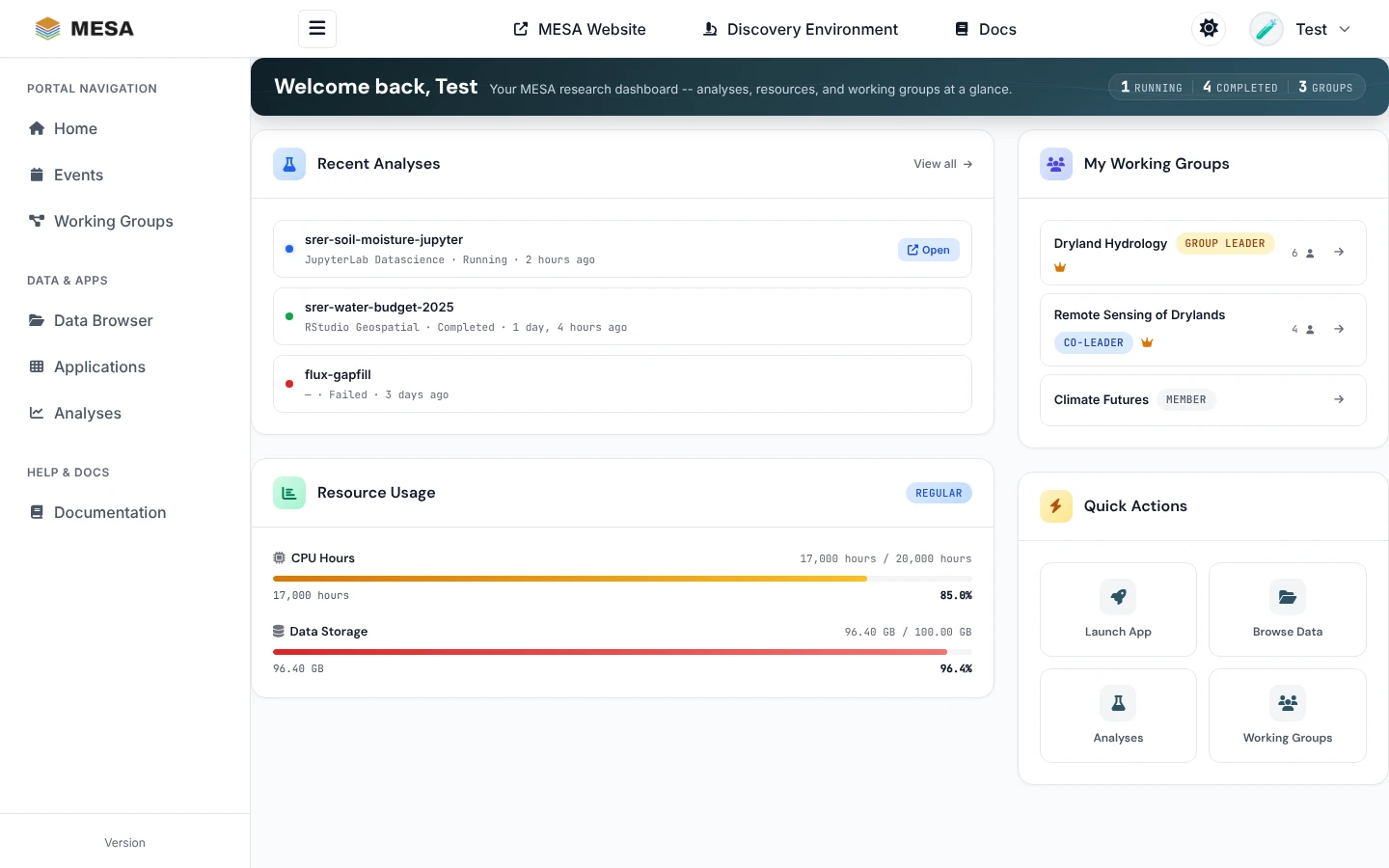
Click Home in the sidebar on the left.
You should see: your dashboard, with four panels.
-
Read Resource Usage.
You should see: CPU hours and Data Store space, each as an amount used against your CyVerse quota.
-
Read down the sidebar.
You should see: three groups. Portal Navigation holds Home, Events, and Working Groups. Data & Apps holds Data Browser, Applications, and Analyses. Help & Docs holds Documentation.
-
Click Data Browser, then Applications, then Analyses, looking at each page before you move on.
You should see: your files; a card for each MESA app; and a list of the apps you have run, which is empty in a new account.
-
Look at the right-hand end of the top bar.
You should see: a round theme button, and your name, which opens your user menu.
-
Click the theme button until the page suits you.
You should see: the portal change between Light, Dark, and System. System follows your computer's setting.
-
Click your name.
You should see: My Profile, Settings, and Logout.
Check it worked
From any page you can reach your files, the apps, and your analyses in one click, and you can say roughly how many CPU hours you have left.
If it didn't
There is no sidebar. On a phone, a tablet, or a narrow window the sidebar folds away. Click the ☰ menu button to open it, or widen the browser window.
Next
- Find MESA's community data in the Data Browser
- Launch MESA JupyterLab with your Data Store mounted
- Reference: MESA Portal overview, "Find your way around" and "Dashboard".
Not yet validated by a person. Drafted with AI assistance on 2026-11-12 from the MESA documentation and followed once on the live portal on 2026-11-13.
Machine-readable versions of this page: Markdown twin · raw source on GitHub · llms.txt · llms-full.txt (whole site). See For AI agents.