Check on a running app and give it more time
Draft: not yet validated
These steps were followed once on the live portal on 2026-11-13, by the AI assistant that drafted them. No person has yet followed them, so a screen may differ. Tell us what you find.
Every interactive app has a time limit. When it runs out the app stops, and anything
not saved under ~/data-store is lost.
You will: know how long your app has left, and have given it more time.
Time: 5 minutes. You need: a running app, such as MESA JupyterLab.
Steps
-
In the portal's sidebar, click Analyses.
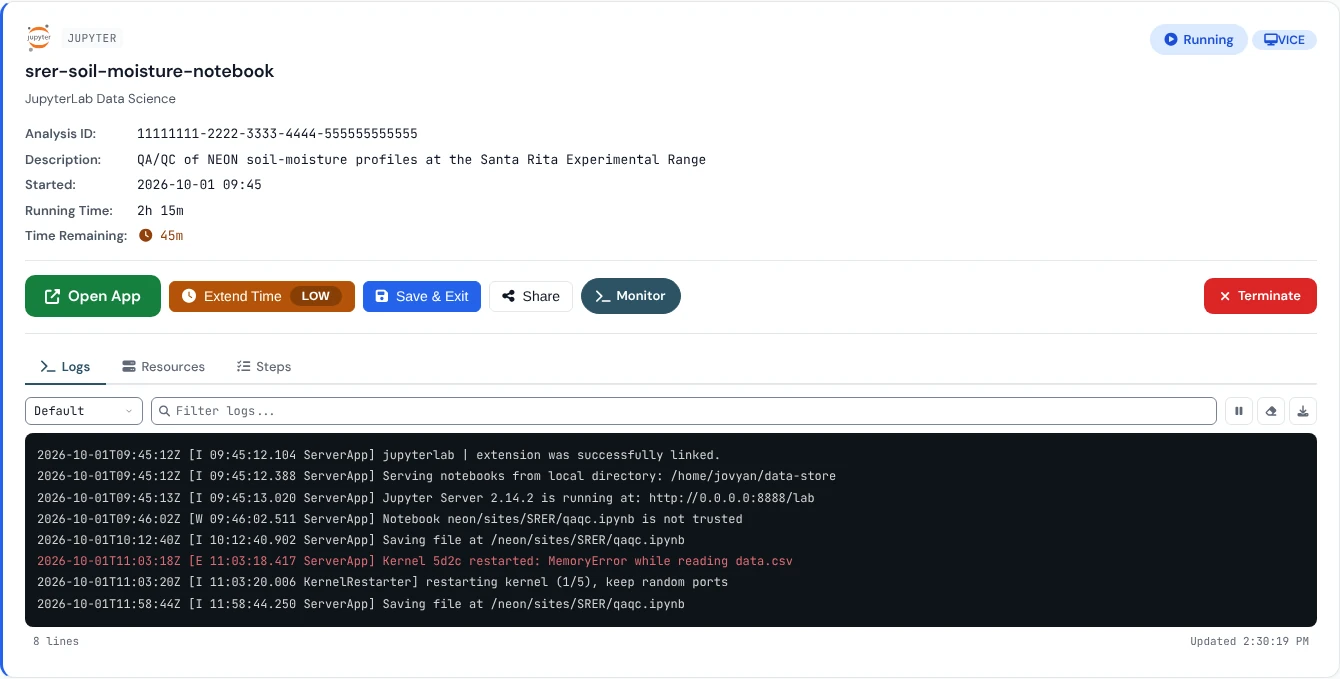
You should see: your app under Running Analyses, on a card with a Running badge.
-
Read Time Remaining on the card.
You should see: hours and minutes. With an hour or less left, the Extend Time button also shows LOW.
-
Click Monitor.
You should see: a panel open under the card, on its Logs tab, with the app's own messages. For JupyterLab they include a line for each notebook you opened.
-
Type a word such as
errorin the Filter logs… box.You should see: only the lines that contain the word, with the word highlighted; for a healthy app, none. This is the first place to look when an app misbehaves.
-
On the same card, click Extend Time, and click OK when the browser asks you to confirm.
You should see: the button read Extending… for a moment.
-
Read Time Remaining again.
You should see: a longer time, and no LOW badge. In our test an app with 59 minutes left had about 25 hours afterwards.
Check it worked
Time Remaining is longer than it was in step 2.
If it didn't
There is no Extend Time button. It is offered only for running interactive apps, and not while an app is still starting. Wait for the badge to read Running, click Refresh, and look again.
Next
- An extended app keeps using your CPU hours. When you have finished, stop it.
- The panel's Resources tab does not yet show live CPU or memory use.
- Reference: Managing analyses, "Work with a running app".
Not yet validated by a person. Drafted with AI assistance on 2026-11-13 and followed once on the live portal that day.
Machine-readable versions of this page: Markdown twin · raw source on GitHub · llms.txt · llms-full.txt (whole site). See For AI agents.