Add metadata to a file or folder
Draft: not yet validated
These steps were followed on the live portal on 2026-11-13, on a newly created account, by the AI assistant that drafted them. No person has yet followed them, so a screen may differ. Tell us what you find.
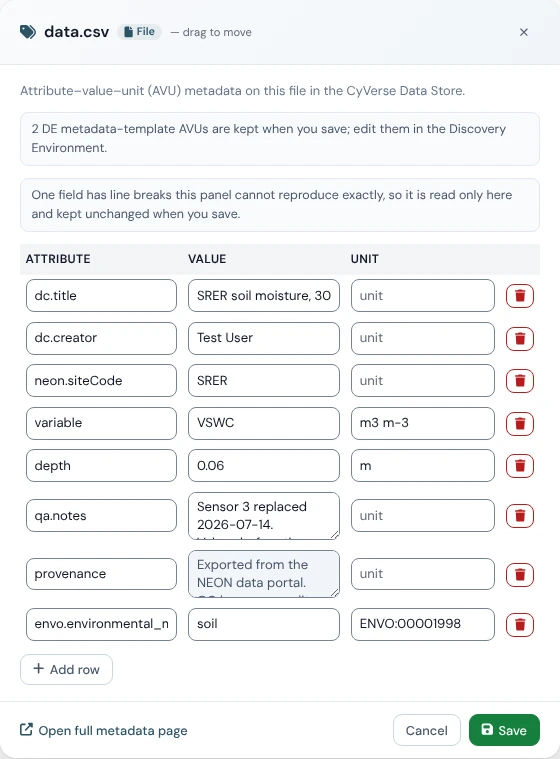
The Data Store keeps metadata as AVUs: an attribute, a value, and an optional unit. "Elevation, 512, m" is one AVU. Metadata stays attached to the file or folder, so it reaches whoever you share the data with, and AI agents using the MESA tools can read it.
You will: have a folder that says, in its own metadata, what it contains.
Time: 5 minutes. You need: to be signed in to the MESA Portal,
and a folder of your own in My Files, such as the mesa-practice folder from the
practice data.
Steps
-
In the sidebar, click Data Browser, then My Files.
You should see: a card for each of your files and folders, each with a small AVUs button under its name.
-
Click AVUs under the folder's name.
You should see: a panel listing the folder's AVUs. For a folder you have just made it says No AVUs yet.
-
Click Add row.
You should see: an empty row with three fields: attribute, value, and unit.
-
Type
descriptionas the attribute and a short sentence as the value, for exampleSynthetic rain-gauge practice data from the MESA tutorials. Leave the unit empty.You should see: your text in the two fields.
-
Click Add row again and enter
contactwith your name as the value.You should see: two rows.
-
Click Save.
You should see: Saved. in the panel, with both rows still listed.
-
Refresh the page and click AVUs on the folder again.
You should see: both rows, as you typed them.
Check it worked
After a page refresh, the folder's AVU panel still lists description and contact
with your values.
If it didn't
The fields cannot be edited, or there is no Add row. You can read the folder but not write to it. Open the folder and read its header: you need Owner or Can edit, not Read only. Use a folder under My Files.
Next
- Share a folder with a collaborator
- Describe a folder with DataCite fields
- Reference: Managing data, "Describe data with metadata (AVUs)", which covers reserved attribute names and the full metadata page with its DataCite, Dublin Core, and EML views.
Not yet validated by a person. Drafted with AI assistance on 2026-11-12 from the MESA documentation and followed once on the live portal on 2026-11-13.
Machine-readable versions of this page: Markdown twin · raw source on GitHub · llms.txt · llms-full.txt (whole site). See For AI agents.